The hidden cost of running a private docker registry backed by S3
Table of Contents
Context
S3 is fast and cheap. Apparently, I was wrong and this is what this blog post is about.
After using S3 bucket as a Docker cache for my BuildKit instance, I wondered what else could be achieved. I then discovered about Adolfo’s blog post and learned that a docker image is just a bunch of tarballs stored in some predefined locations. When we perform a docker pull, we send GET requests to download the files. So, if I have those blobs properly in place, I can sort of create my own docker registry using S3.
I then read about the discussion on Hacker News and learned about existing registry solutions that offer S3 as a storage backend, such as Harbor, JFrog and CNCF Distribution. The advantage of using pre-built solutions is that I do not need to write my own program to put the blobs in the correct place. I can just perform regular docker pull and docker push operations on my machine / CI pipeline.
I decided to give CNCF Distribution a try because:
- It’s lightweight
- It supports S3-compatible storage as a storage backend
- It supports CloudFront as middleware, faster pull and free 1TB egress (yay)
Cost calculation
Before jumping into the rabbit hole, I did some basic cost comparisons between S3 and AWS ECR. S3 charges for storage, API requests and egress. ECR charges for storage and egress. S3’s storage cost is about 1⁄4 of ECR’s, and the egress charge is similar. But since I had CloudFront in front of my bucket, I got free egress. And for the API request charge, to be honest, I sort of ignored it because I thought it was cheap (big mistake!).
Here are the API charges for S3:
- $0.005 per 1,000 PUT, COPY, POST, or LIST requests
- $0.004 per 10,000 GET and all other requests
Hah, less than a cent for a thousand requests; I can’t be using that many requests, right, right…?
Let’s go
Setting it up was quite easy; I read the documentation and wrote some Terraform code to create all the necessary resources. In less than a day, I got everything I needed ready, e.g. registry, S3 bucket, CloudFront distribution, authentication and SSL.
I then tested it with some small repos, and it worked just like Docker Hub.
Performance bottleneck
I proceeded to upload some repos with large (> 200 MB) layers and immediately noticed the first issue. For some reason, when the layers were pushed, they stuck at 100% for a long time. The larger the layers, the longer they stuck.
42d8dc593b1c: Layer already exists
af9f2d34aeef: Pushing [===========================================>]  277.36MB
At first, I thought it might be a latency issue, so I moved my bucket to a region closer to my server, but it didn’t solve the problem. So, I suspected either some operations on S3 were taking too long, or my Nginx reverse proxy was acting weird.
I did some research and noticed I was not the only one. Switching to the local storage backend solved this issue for me.
Hidden (or not so obvious) cost
At this point, you can already guess what is the surprise cost of running this stack. It’s the API cost. Here is the cost breakdown for my first day of usage:
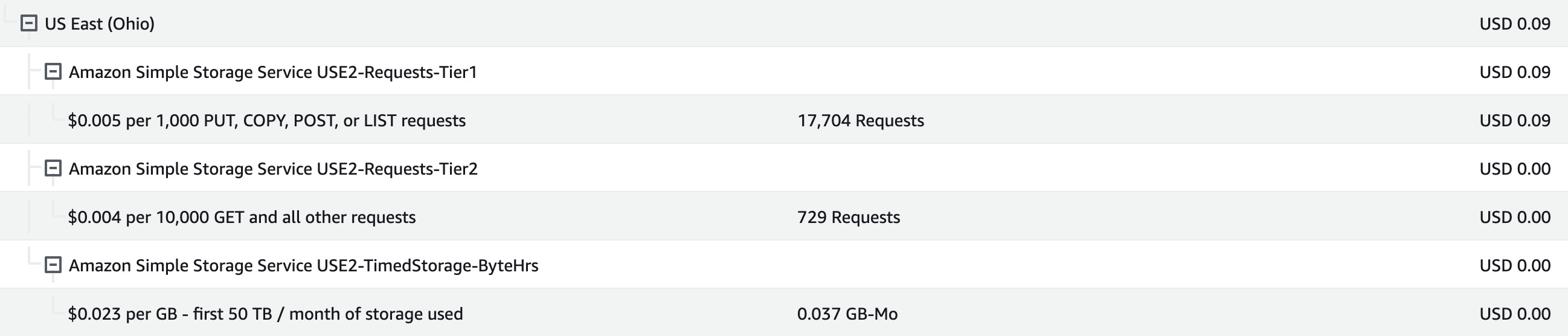
There was no egress fee, so I skipped that one. All I did was upload some images with varying sizes and some pulls. As you can see, the API requests charge was much higher than the storage charge. I was shocked by this number of API requests, more specifically regarding the state-mutating related APIs.
I performed a test push to the registry using the Busybox image and observed the logs. Here is the simplified version:
# Check whether the layer f2fac7862 is there
HEAD /v2/busybox/blobs/sha256:f2fac786239ff630b13e83d8417e17fbff14e19e8be6563c14e3bd65715bf87a HTTP/1.0 404
# Upload the layer f2fac7862
POST /v2/busybox/blobs/uploads/ HTTP/1.0 202
PATCH /v2/busybox/blobs/uploads/36a1168d-fb44-4fc4-8d4e-a37b1b50c87e?_state=<masked> HTTP/1.0 202
PUT /v2/busybox/blobs/uploads/36a1168d-fb44-4fc4-8d4e-a37b1b50c87e?_state=<masked> HTTP/1.0 201
# Confirm the layer f2fac7862 was uploaded
HEAD /v2/busybox/blobs/sha256:f2fac786239ff630b13e83d8417e17fbff14e19e8be6563c14e3bd65715bf87a HTTP/1.0 307

# Check whether the layer 63cd0d5fb1 is there
HEAD /v2/busybox/blobs/sha256:63cd0d5fb10d7d46ba29e292442263a4e6b114389290559295bcbdb10c687995 HTTP/1.0 404
# Upload the layer 63cd0d5fb1
POST /v2/busybox/blobs/uploads/ HTTP/1.0 202
PATCH /v2/busybox/blobs/uploads/997e22e5-d663-4c55-9a8e-515583199c10?_state=<masked> HTTP/1.0 202
PUT /v2/busybox/blobs/uploads/997e22e5-d663-4c55-9a8e-515583199c10?_state=<masked> HTTP/1.0 201
# Confirm the layer 63cd0d5fb1 was uploaded
HEAD /v2/busybox/blobs/sha256:63cd0d5fb10d7d46ba29e292442263a4e6b114389290559295bcbdb10c687995 HTTP/1.0 307

# Upload the manifest
PUT /v2/busybox/manifests/latest HTTP/1.0 201
Keep in mind that these were the HTTP requests sent to the registry server, not the S3. To view S3 operations, I changed the registry log level to debug and performed the test push again. Since the log was too verbose, I asked ChatGPT to extract the S3 operations for me.
GetContent:
 Operation: s3aws.GetContent("/docker/registry/v2/repositories/busybox/_layers/sha256/f2fac786239ff630b13e83d8417e17fbff14e19e8be6563c14e3bd65715bf87a/link")
 Duration: 304.211183ms

PutContent:
 Operation: s3aws.PutContent("/docker/registry/v2/repositories/busybox/_uploads/0d67745a-3a1e-406d-8da7-6f872cdc4552/startedat")
 Duration: 518.585115ms

Stat:
 Operation: s3aws.Stat("/")
 Duration: 344.329491ms

Writer:
 Operation: s3aws.Writer("/docker/registry/v2/repositories/busybox/_uploads/0d67745a-3a1e-406d-8da7-6f872cdc4552/data", false)
 Duration: 860.022943ms

PutContent:
 Operation: s3aws.PutContent("/docker/registry/v2/repositories/busybox/_uploads/0d67745a-3a1e-406d-8da7-6f872cdc4552/hashstates/sha256/0")
 Duration: 737.636465ms

GetContent:
 Operation: s3aws.GetContent("/docker/registry/v2/repositories/busybox/_uploads/0d67745a-3a1e-406d-8da7-6f872cdc4552/startedat")
 Duration: 66.775135ms

Writer:
 Operation: s3aws.Writer("/docker/registry/v2/repositories/busybox/_uploads/0d67745a-3a1e-406d-8da7-6f872cdc4552/data", true)
 Duration: 339.986821ms

PutContent:
 Operation: s3aws.PutContent("/docker/registry/v2/repositories/busybox/_uploads/0d67745a-3a1e-406d-8da7-6f872cdc4552/hashstates/sha256/1920762")
 Duration: 372.1883ms

PutContent:
 Operation: s3aws.PutContent("/docker/registry/v2/repositories/busybox/_uploads/0d67745a-3a1e-406d-8da7-6f872cdc4552/hashstates/sha256/1920762")
 Duration: 378.91486ms

GetContent:
 Operation: s3aws.GetContent("/docker/registry/v2/repositories/busybox/_uploads/0d67745a-3a1e-406d-8da7-6f872cdc4552/startedat")
 Duration: 152.887922ms

Writer:
 Operation: s3aws.Writer("/docker/registry/v2/repositories/busybox/_uploads/0d67745a-3a1e-406d-8da7-6f872cdc4552/data", true)
 Duration: 367.370529ms

PutContent:
 Operation: s3aws.PutContent("/docker/registry/v2/repositories/busybox/_uploads/0d67745a-3a1e-406d-8da7-6f872cdc4552/hashstates/sha256/0")
 Duration: 552.896598ms

Stat:
 Operation: s3aws.Stat("/docker/registry/v2/repositories/busybox/_uploads/0d67745a-3a1e-406d-8da7-6f872cdc4552/data")
 Duration: 180.28745ms

List:
 Operation: s3aws.List("/docker/registry/v2/repositories/busybox/_uploads/0d67745a-3a1e-406d-8da7-6f872cdc4552/hashstates/sha256")
 Duration: 158.165347ms

GetContent:
 Operation: s3aws.GetContent("/docker/registry/v2/repositories/busybox/_uploads/0d67745a-3a1e-406d-8da7-6f872cdc4552/hashstates/sha256/1920762")
 Duration: 90.985984ms

Stat:
 Operation: s3aws.Stat("/docker/registry/v2/blobs/sha256/f2/f2fac786239ff630b13e83d8417e17fbff14e19e8be6563c14e3bd65715bf87a/data")
 Duration: 85.19667ms

Stat:
 Operation: s3aws.Stat("/docker/registry/v2/repositories/busybox/_uploads/0d67745a-3a1e-406d-8da7-6f872cdc4552/data")
 Duration: 152.916286ms

Move:
 Operation: s3aws.Move("/docker/registry/v2/repositories/busybox/_uploads/0d67745a-3a1e-406d-8da7-6f872cdc4552/data", "/docker/registry/v2/blobs/sha256/f2/f2fac786239ff630b13e83d8417e17fbff14e19e8be6563c14e3bd65715bf87a/data"
 Duration: 1.09396016s

Stat:
 Operation: s3aws.Stat("/")
 Duration: 111.631198ms

PutContent:
 Operation: s3aws.PutContent("/docker/registry/v2/repositories/busybox/_layers/sha256/f2fac786239ff630b13e83d8417e17fbff14e19e8be6563c14e3bd65715bf87a/link")
 Duration: 315.580225ms

Delete:
 Operation: s3aws.Delete("/docker/registry/v2/repositories/busybox/_uploads/0d67745a-3a1e-406d-8da7-6f872cdc4552")
 Duration: 714.894399ms

GetContent:
 Operation: s3aws.GetContent("/docker/registry/v2/repositories/busybox/_layers/sha256/63cd0d5fb10d7d46ba29e292442263a4e6b114389290559295bcbdb10c687995/link")
 Duration: 152.346767ms
That was a lot of API requests for a simple Busybox image! The registry was uploading the blobs to a temporary _upload folder before moving them to the _layers folder. This is a registry feature for resumable uploads and content verification, but unfortunately, AWS bills us for this API usage.
What’s next
I switched to the local storage backend for my registry when I noticed these issues, and so far, it has been sufficient for my personal usage. The only way to deal with repo and tags management is via API or some third-party web UI, but there are still some unsolved issues.
In the future, I will probably try Adolfo’s approach to directly put the blobs in their required location, rather than temporary folders first.
It was a good learning experience, and now I understand why ECR charges for that amount. For those who prefer an “it just works” solution, existing products such as DockerHub and ECR are the best to go. Otherwise, Harbor and JFrog may be a better solution for their more polished UI and feature set.