Spring Batch microservice optimization
Table of Contents
Disclaimer: The views and opinions expressed in this blog are solely my own and do not necessarily reflect those of my employer or any team I am or have been a part of. This blog reflects my personal understanding and interpretation of the subject matter.
A few months ago at work, I was optimizing the throughput and memory usage of our Spring Batch microservice, which was experiencing performance bottlenecks and prompting some user feedback regarding report processing delays. For context, the microservice is responsible for generating reports for the users. It’s an asynchronous process where the user submits a request and will be notified via email when the report is ready for review.
In this blog post, I’m going to share some of the steps that we’ve taken to improve the throughput by 220x in internal benchmarks, compared to the original implementation and solve the out of memory (OOM) issues that we faced constantly.
Let’s dive in.
Better memory management
The microservice retrieves the raw data from our object storage, processes them and finally writes the records into the database.
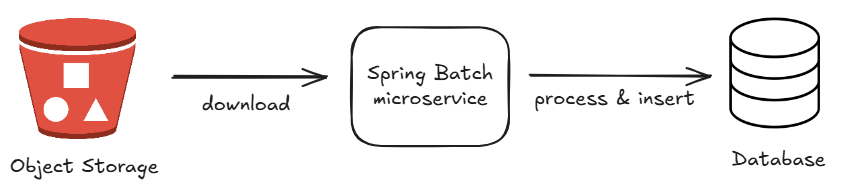
The raw data consists of smaller chunks and each chunk contains a list of gigantic JSON objects. In our code, we used to read each chunk by loading the entire object into memory at once using ObjectMapper, something like below:
import com.fasterxml.jackson.databind.ObjectMapper

companion object {
	private val objectMapper = ObjectMapper().apply {
	    registerKotlinModule()
	        .registerModule(JavaTimeModule())
	        .setSerializationInclusion(JsonInclude.Include.NON_NULL)
	        .disable(SerializationFeature.WRITE_DATES_AS_TIMESTAMPS)
	        .writerWithDefaultPrettyPrinter()
	}
}
...
downloadedFiles.forEach {
	// read everything at one go
	val data: List<GiganticJsonObject> = objectMapper.readValue(fileChunk)
	processAndDumpToDb(data)
}
The above approach caused our microservice to consume a lot of memory and sometimes even throw insufficient heap space error. The temporary solution was to use a bigger instance with more memory while we worked on the fix.
To mitigate this issue, we utilized the Jackson Streaming API, which offers a high-performance JSON parser, allowing us to stream GiganticJsonObject objects one by one. We create two iterators, one for the file chunk and one for the GiganticJsonObject. The file chunk iterator is responsible for looping all of our downloaded files, while the GiganticJsonObject iterator is for looping each GiganticJsonObject in the file chunk.
The Jackson Streaming API requires us to define the parsing logic based on the tokens encountered. Since the JSON objects in our file chunks follow a pre-defined format, we are able to capture the object easily.
private var giganticJsonObjectIterator: Iterator<GiganticJsonObject>? = null
private var filesIterator: Iterator<File>? = null

...
try {
    initializeIfNeeded()

    while (true) {
        // 1. Return next object if available
        if (giganticJsonObjectIterator?.hasNext() == true) {
            return giganticJsonObjectIterator!!.next()
        }

        // Logic to clean up & exit
		...

        // 3. Process next file
        currentFile = filesIterator!!.next()
        jsonParser = objectMapper.factory.createParser(currentFile)

        // 4. Advance the parser to the "GiganticJsonObject" array
        ...
        // 5. Prepare the iterator over GiganticJsonObject
        if (jsonParser!!.currentToken() == JsonToken.START_ARRAY) {
            jsonParser!!.nextToken()
            giganticJsonObjectIterator = parseGiganticJsonObject(jsonParser!!)
        } else {
            logger.error { "GiganticJsonObject array not found in file: ${currentFile?.name}" }
            giganticJsonObjectIterator = null
        }
    }
} catch (e: Exception) {
    ...
}
...

private fun parseGiganticJsonObject(parser: JsonParser): Iterator<GiganticJsonObject> {
    return object : Iterator<GiganticJsonObject> {
        private var nextGiganticJsonObject: GiganticJsonObject? = null
        private var hasNextComputed = false

        override fun hasNext(): Boolean {
            if (hasNextComputed) {
                return nextGiganticJsonObject != null
            }
            if (parser.currentToken() == JsonToken.START_OBJECT) {
                nextGiganticJsonObject = objectMapper.readValue(parser, GiganticJsonObject::class.java)
                hasNextComputed = true
                return true
            } else if (parser.currentToken() == JsonToken.END_ARRAY) {
                return false
            }
            // Advance to the next token if not at START_OBJECT
            parser.nextToken()
            return hasNext()
        }

        override fun next(): GiganticJsonObject {
            if (!hasNextComputed) {
                hasNext()
            }
            if (nextGiganticJsonObject == null) {
                throw NoSuchElementException()
            }
            hasNextComputed = false
            return nextGiganticJsonObject!!
        }
    }
}
Using the above streaming mechanism, we are able to smoothen the memory usage of our microservice and even process the files in a smaller instance that will otherwise fail using the old approach.
Tasklets and Chunks
In Spring Batch, there are two ways to implement a job: tasklets and chunks. Tasklet is simpler and we just need to define what to do in a single class. Chunk however, is more powerful and scalable but requires us to implement the Reader, Processor and Writer classes.
In our project, we opted for the Tasklet version during the early days due to its simplicity and the load we are handling. It had served us well for some time. However, as data volume increased, job execution time grew significantly, leading to unacceptably long wait times for users.
One thing to note is that Tasklet will wrap everything into a single transaction and an immediate rollback is performed if the job fails. In our case, our transaction is getting bigger and bigger while we are reading all the file chunks. This leads to slower processing after each file processed.
To mitigate this issue, we migrated our Spring Batch job to the Chunk based processing. We define our logic for the necessary classes and perform transaction commit at a smaller chunk. The result is significant and we are seeing an improvement up to 220 times in our internal testing.
Conclusion
In this post, I’ve outlined a few techniques we used to handle large data volumes more efficiently, including streaming JSON parsing and switching from Tasklet-based to Chunk-based Spring Batch jobs. These changes led to substantial throughput and memory usage improvements in our specific context.
While these approaches proved effective in our case, they may not apply universally. Every system has its own constraints and trade-offs. Still, this experience has been a valuable opportunity to explore deeper optimization strategies and improve the resilience of long-running batch processes.