How I trained my own GPT-2 and fine-tuned it into an instruct model
Table of Contents
- 1. Datasets
- 2. Tokenizer
- 2.1 Train the tokenizer
- 2.2 Tokenize the dataset
- 3. Pre-training
- 3.1 Fixing the effective batch size
- 3.2 Checkpoints comparison
- 4. Instruct fine-tuning
- 4.1 Selecting the best checkpoint
- 4.2 Prepare the datasets
- 4.3 Training
- 4.4 Inference
- 4.5 Benchmarks
- Conclusion
- Appendix
- A. Sampling Parameters
- B. Wrong dataset preparation method for model evaluation
This is the second blog post about LLM. All along, I had been fine-tuning models but never really trained a model from scratch. I then got recommended the video from Andrej Karpathy about LLM Deep Dive, where he introduced a few major steps to build a large language model.
So this blog post is about how I trained my GPT-2-like model from scratch and fine-tuned it into an instruct-following model.
My goal was to build an LLM that mainly does the following:
- Able to construct sentences in English without major grammatical flaws.
- Able to (somehow) generate a coherent response to my query.
- No need to be factually correct.
- Not too large in parameter size (because this scales up the computation), preferably less than 1B parameters.
- 1024 context length.
This blog post is divided into four main sections, where I will provide code snippets where necessary:
- Datasets selection
- Training the tokenizer
- Training the causal (base) model
- Fine-tune the base model into instruct-following
The full source code is available at my GitHub.
Since this will be a little lengthy, grab a coffee and continue reading.
1. Datasets
Before training a language model, one has to prepare a bunch of text corpus, either scrape it off the web or hand-craft some niche samples. I’ve decided to use whatever public datasets were available because this was the fastest and most cost-efficient way.
The FineWeb dataset on HuggingFace is a collection of over 15 trillion tokens from the internet. This dataset focuses on English web data and it offers several subsets:
- 350 billion tokens
- 100 billion tokens
- 10 billion tokens
I selected the 10 billion tokens subset for this experiment due to its size and my ideal model parameter size (more on this in Section 3).
2. Tokenizer
A tokenizer is something that can encode a given input into “tokens” (which is a bunch of integers) and decode it back to the original input. An example below:

When we send a query to a language model, the model actually “sees” the tokens instead of the original sentence. When it’s generating a response, it’s generating tokens as well.
A tokenizer can be trained to assign different token id to different words or characters, including other languages. Common phrases are usually grouped into a single token, while a rare word will be broken down into several tokens.
I suggest you to try out the ChatGPT tokenizer for a better visualization.
2.1 Train the tokenizer
The algorithm that I used for training my tokenizer was Byte pair encoding(BPE), more specifically, the byte-level BPE.
The BPE algorithm repetitively replaces the most common pair of characters (or bytes) in a given text with a new one until no pair is found more than once or the vocabulary size is reached.
Let’s take the example from Wikipedia and visualize it in a diagram:
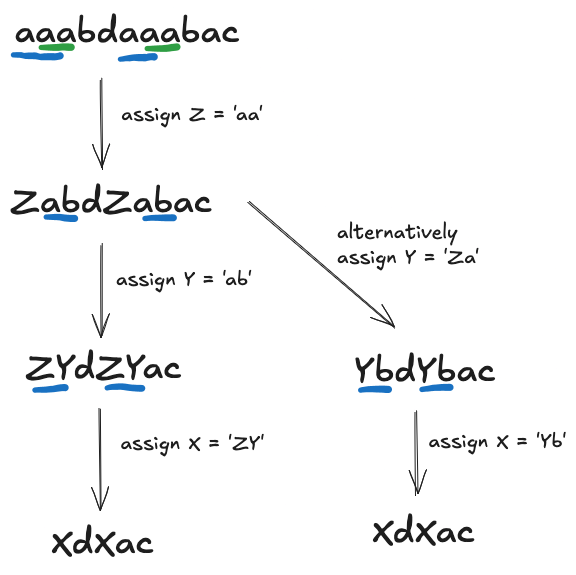
Since there are many languages, a more common approach is to convert the inputs into UTF-8 and process them as bytes.
The following Python code is for training a tokenizer based on the FineWeb dataset and saving the trained tokenizer to disk:
from datasets import load_dataset
from tokenizers import ByteLevelBPETokenizer
from transformers import PreTrainedTokenizerFast

dataset = load_dataset(
    "HuggingFaceFW/fineweb",
    "sample-10BT",
    split="train",
    streaming=False
)
# Remove non text columns, https://discuss.huggingface.co/t/speed-issues-using-tokenizer-train-new-from-iterator-on-50gb-dataset/29125/2
dataset = dataset.remove_columns([
	col for col in dataset.column_names if col != "text"
])

# Train the tokenizer
tokenizer = ByteLevelBPETokenizer()
special_tokens = ["<s>", "<pad>", "</s>", "<unk>", "<mask>"]

def batch_iterator(dataset, batch_size=500):
    for batch in dataset.iter(batch_size=batch_size):
        yield batch["text"]

tokenizer.train_from_iterator(
    batch_iterator(dataset),
    vocab_size=52_000,
    min_frequency=2,
    special_tokens=special_tokens,
    show_progress=True
)

tokenizer.save("fineweb-10bt-tokenizer-bpe.json")
I selected 52k as my vocab size, slightly larger than the original GPT-2 (50257). For comparison, the vocab size for GPT-4 is about 100k.
I also added a few special tokens (e.g., <s>, </s>, etc.) for indicating the start/end of sequence, padding and masking.
2.2 Tokenize the dataset
Once I had the tokenizer ready, I began to tokenize the dataset.
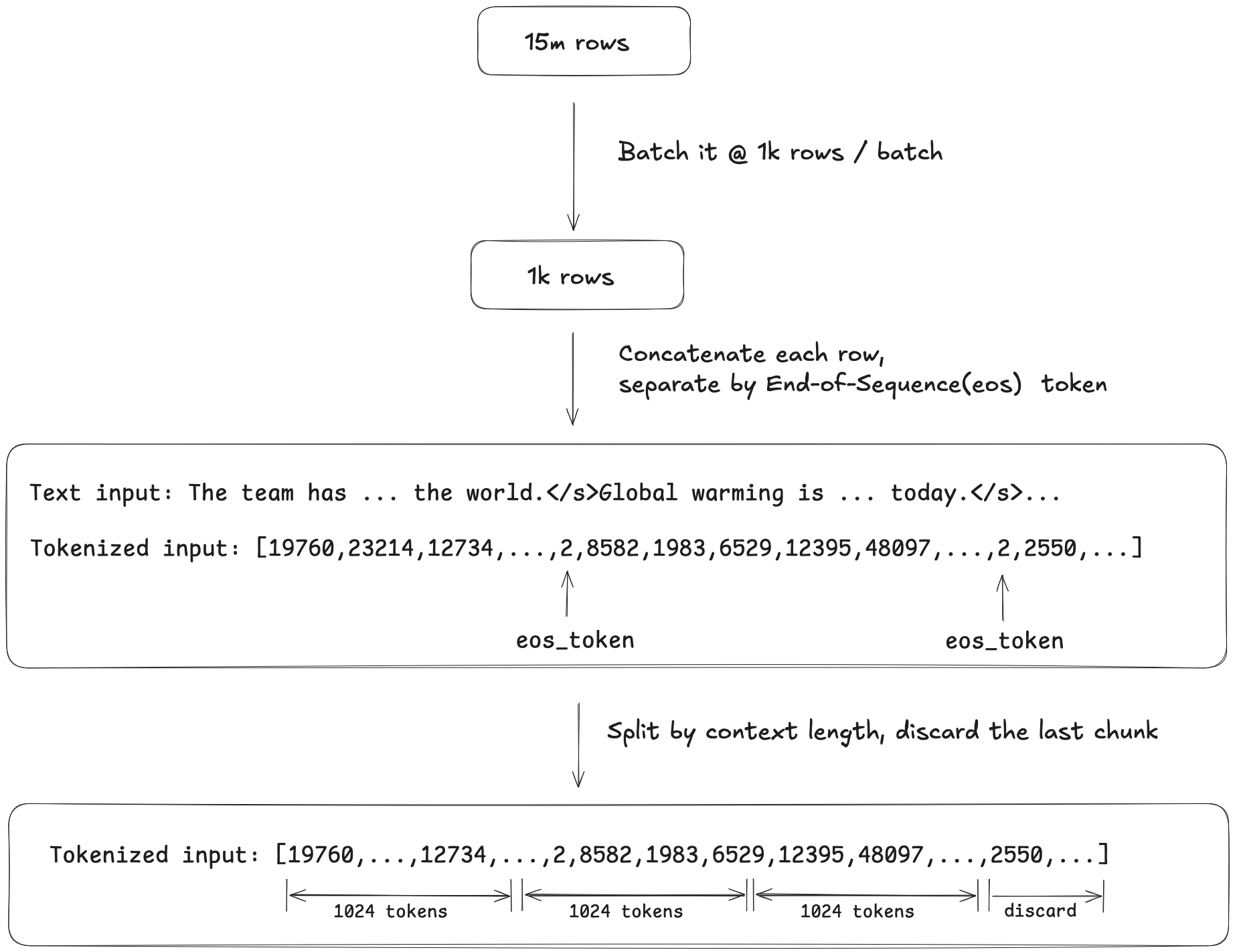
There were about 15 million rows of text and I batched them into groups of 1k. Within each batch, the samples were tokenized, concatenated into a long string and joined by the End-of-Sequence (eos) token, which I configured to </s>. I then split the tokens into context length (1024)-long array chunks, as the training process required a fixed-length input. The last chunk that was less than the context length was discarded.
The code to tokenize the dataset:
import os
from transformers import PreTrainedTokenizerFast
from datasets import load_dataset

tokenizer = PreTrainedTokenizerFast(
    tokenizer_file="fineweb-10bt-tokenizer-bpe.json",
    bos_token="<s>",
    eos_token="</s>",
    pad_token="<pad>",
    unk_token="<unk>",
    mask_token="<mask>",
)

context_length = 1024

def concatenate_and_chunk(element):
    all_token_ids = []
    for text in element["text"]:
        token_ids = tokenizer.encode(text, add_special_tokens=False)
        all_token_ids.extend(token_ids)
        all_token_ids.append(tokenizer.eos_token_id)

    total_length = len(all_token_ids)

    if total_length < context_length:
        return {"input_ids": [], "labels": []}

    total_length = (total_length // context_length) * context_length

    # Split the concatenated tokens into chunks of context_length
    chunks_input_ids = []
    for i in range(0, total_length, context_length):
        chunk = all_token_ids[i : i + context_length]
        if len(chunk) == context_length:
            chunks_input_ids.append(chunk)

    output = {"input_ids": chunks_input_ids, "labels": chunks_input_ids.copy()}
    return output


raw_dataset = load_dataset(
    "HuggingFaceFW/fineweb",
    "sample-10BT",
    split="train",
)

raw_dataset = raw_dataset.remove_columns(
    [col for col in raw_dataset.column_names if col != "text"]
)

print("Start Tokenization.")
tokenized_dataset = raw_dataset.map(
    concatenate_and_chunk,
    batched=True,
    remove_columns=raw_dataset.column_names, # Remove the original 'text' column
)

print("Tokenization complete.")
print(f"Example tokenized dataset: {tokenized_dataset[0]}")

tokenized_dataset.save_to_disk("/tokenized-dataset")
Since the tokenization process was very CPU-intensive, I launched a 192-core machine to process the entire dataset and noticed the process didn’t fully saturate the CPU. After I finished tokenising the dataset, I realized there was a num_proc parameter to specify the number of processes, which hopefully could speed up the process.
tokenized_dataset = raw_dataset.map(
    concatenate_and_chunk,
    batched=True,
    remove_columns=raw_dataset.column_names,
+   num_proc=os.cpu_count()
)
The tokenized dataset was about 120GB in disk size and I uploaded it to S3 for training on a different machine.
3. Pre-training
I aimed to train a model with < 1 billion parameter size using the GPT-2 architecture. While researching for the suitable parameter size, I read about the Chinchilla/Hoffman scaling laws, which suggested that 20 text tokens per parameter were needed to achieve a notable performance.
Since my dataset was 10 billion tokens, my model should be around 0.5B. However, due to budget constraints, I reduced the parameter size to 0.35B, about 28 tokens per parameter.
Below is my model configuration:
config = GPT2Config(
    vocab_size=tokenizer.vocab_size,
    n_positions=1024,
    n_ctx=1024,
    n_embd=1024,
    n_layer=24,
    n_head=16,
    bos_token_id=tokenizer.bos_token_id,
    eos_token_id=tokenizer.eos_token_id,
    pad_token_id=tokenizer.pad_token_id
)
Training argument wise, I trained on 1 epoch, with initial learning rate set to 1e-4 and 3% warm-up.
In order to saturate the GPU VRAM (H200 GPU with 141GB), I configured the training batch size to 64 and gradient accumulation step to 32, resulting in an effective batch size of 2048.
The GPU VRAM usage was about 106GB (75%) throughout the training.
training_args = TrainingArguments(
    output_dir="./fineweb-gpt2-356m",
    overwrite_output_dir=True,
    num_train_epochs=1,
    per_device_train_batch_size=64,
    gradient_accumulation_steps=32,
    learning_rate=1e-4,
    weight_decay=0.01,
    warmup_ratio=0.03,
    logging_steps=25,
    save_steps=500,
    save_total_limit=3,
    prediction_loss_only=True,
    fp16=True,
    logging_dir='./logs-356m',
    report_to="wandb",
    run_name = "fineweb-gpt2-356m-0p2",
    torch_compile=True,
    lr_scheduler_type="cosine",
    seed=3047,
)
3.1 Fixing the effective batch size
While the training was ongoing, I continued researching the most suitable effective batch size. I then found the paper Scaling Law for Language Models Training Considering Batch Size that suggested that a large batch size leads to fewer training steps, at which a higher learning rate is needed to compensate for that. They also mentioned that the batch size of 1M tokens produced the lowest loss compared to a higher batch size.
In my case, my effective batch size was 2048, with each example being 1024 tokens long, so my batch size in tokens was about 2M. I also realized my learning rate was too low.
I decided to stop my training (at 1500 steps), changed the effective batch size to 1024 by reducing the gradient accumulation step to 16 and resumed the training.
training_args = TrainingArguments(
	...
-   gradient_accumulation_steps=32,
+   gradient_accumulation_steps=16,
)

- trainer.train()
+ trainer.train(resume_from_checkpoint=True)
For this project, I used DataCrunch as my GPU provider, as they offer the best pricing on the market. They have two pricing models, fixed and dynamic. The dynamic price changes daily according to the users’ demand.
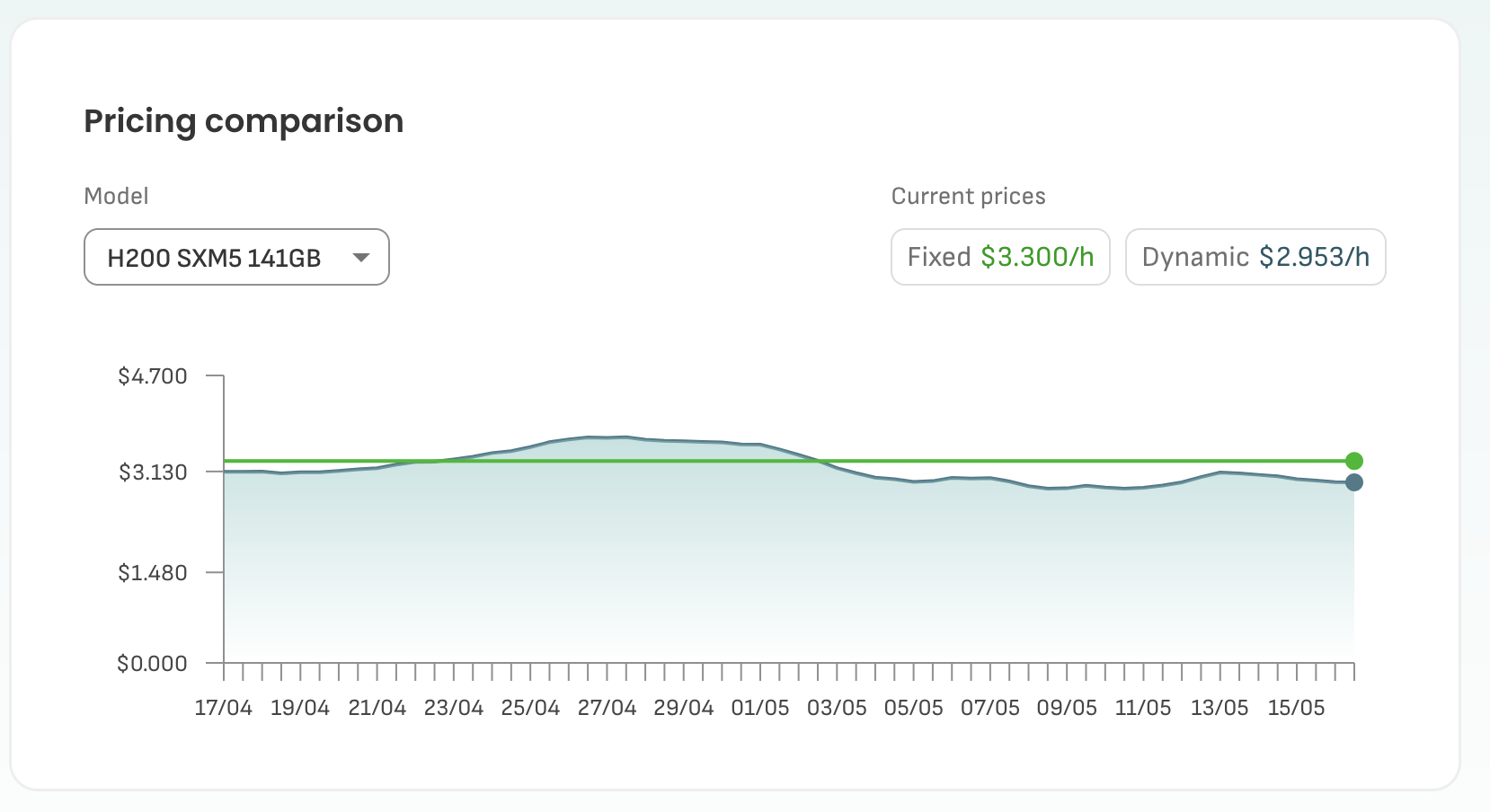
During my training, I launched a H200 machine with 44 CPU cores, 185GB system RAM and 500GB NVME disk at about $3 / hour under the dynamic pricing model. For comparison, a H200 machine on RunPod costs $3.59 / hour on the community cloud, not including the storage cost.
The instance’s download speed was around 95 MBytes/s when I downloaded the tokenized dataset from S3 using AWS CLI. Even though it was not slow, downloading a huge dataset took up some precious computing time. However, note that the S3 bucket was located in the US East region, while the instance was in the EU region, so it may be faster if they were located in the same region.
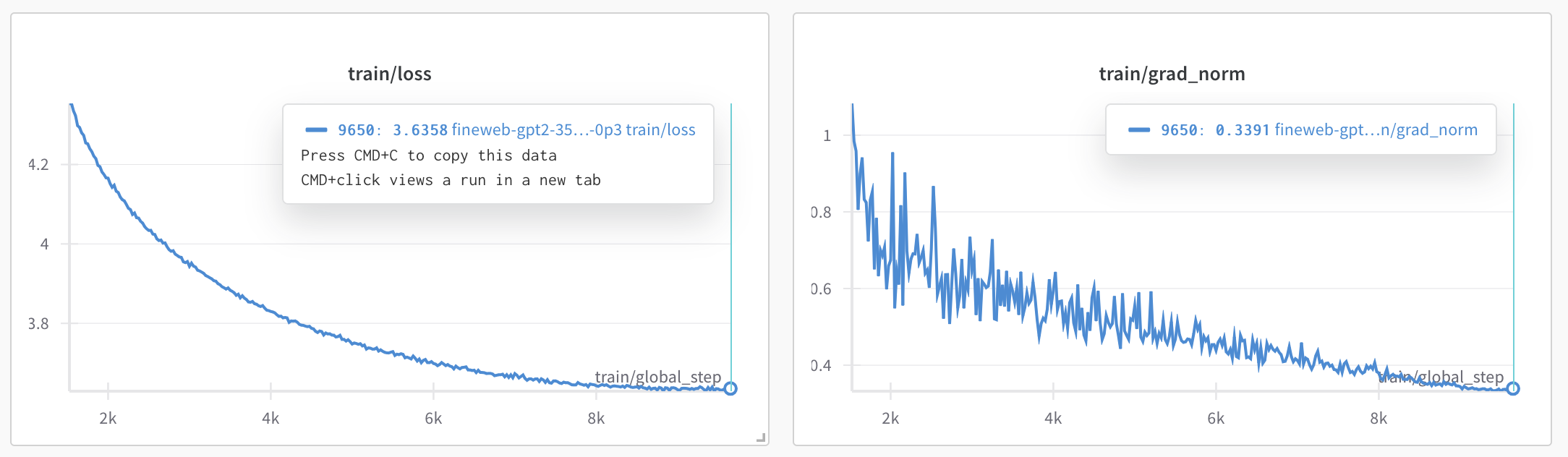
The entire pre-training process took about 33 hours (phase 1 + phase 2) and the final training loss was about 3.63.
3.2 Checkpoints comparison
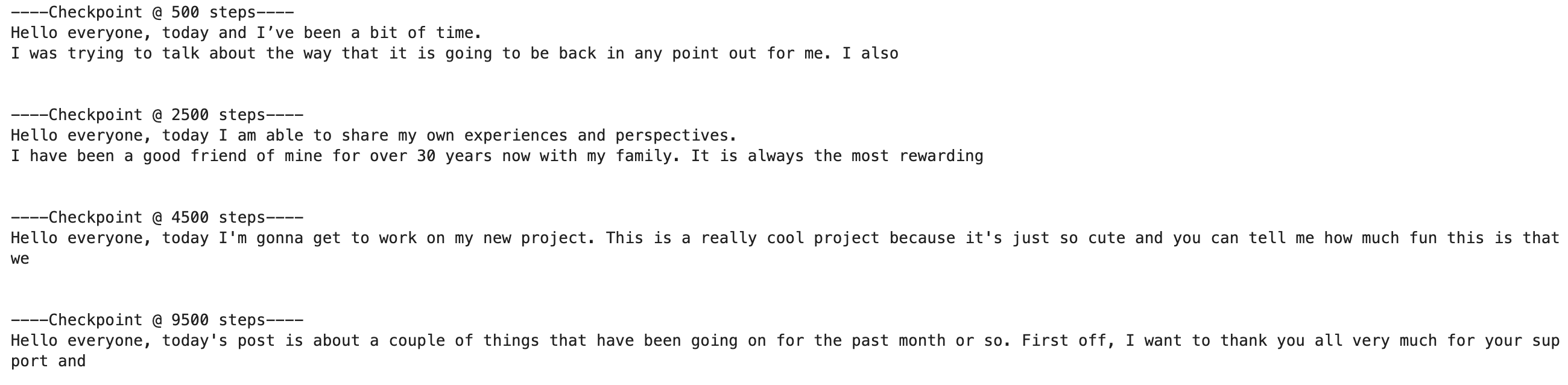
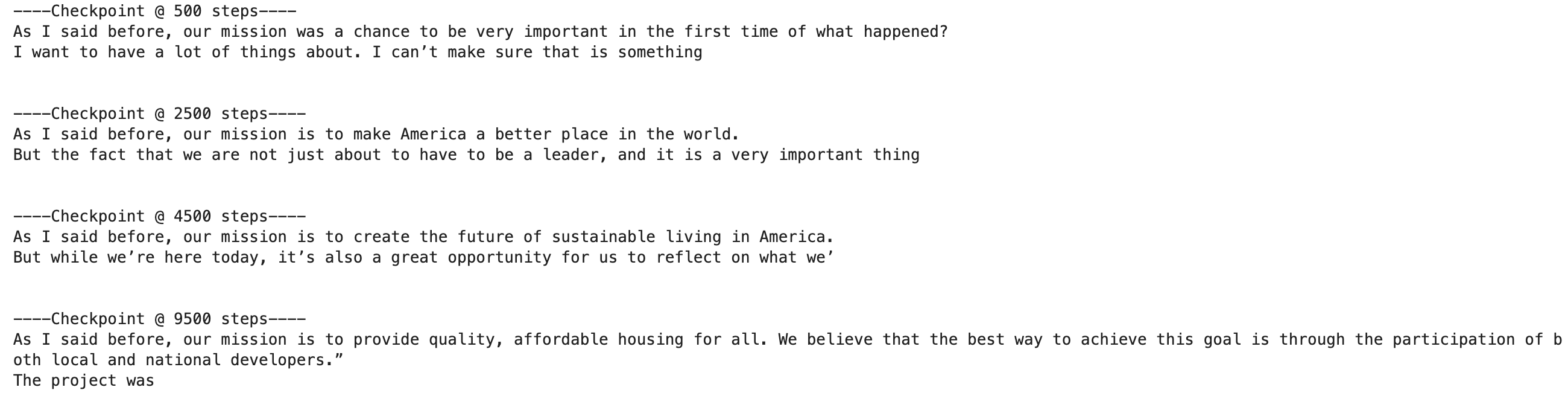
I saved the model every 500 steps and at the end of the pre-training process, I selected a few checkpoints to demonstrate their gradual improvement throughout the training. I gave the checkpoints a few words to start the sentence and they would complete the rest of the passage.
Here are some samples,
Hello everyone, today
As I said before, our mission
Malaysia is a
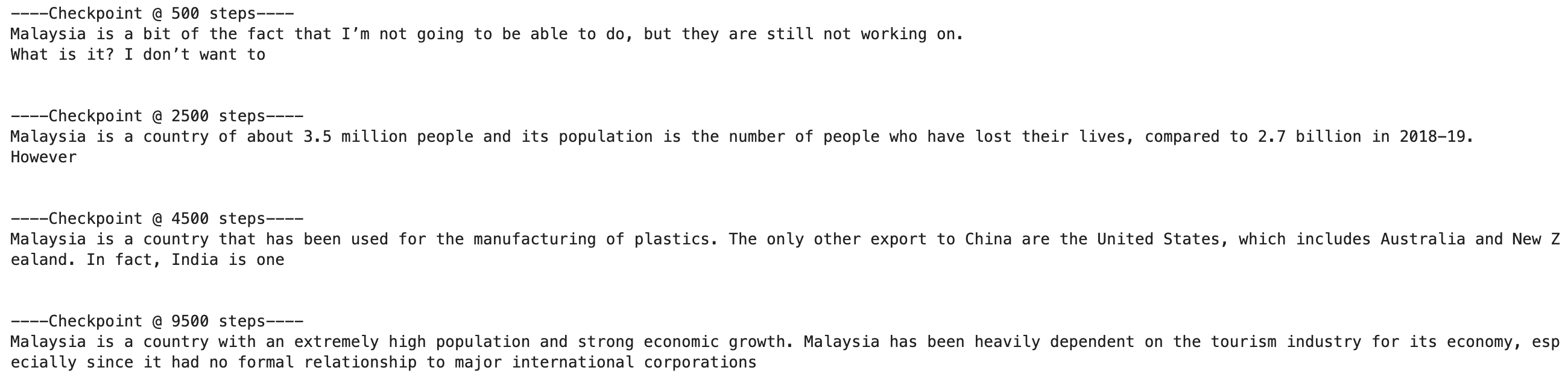
As we can see from the outputs, the model was getting better in generating coherent and grammatically correct sentences.
However, even though the model could generate some coherent texts, it was still a “fancier auto-complete” at that point. I wanted a model that could answer my queries like we usually do with ChatGPT. That brings us to the next section, instruct-following fine-tuning.
4. Instruct fine-tuning
Instruct-following fine-tuning is important to let the model know how to respond when we ask a question, for example:
User: Can you tell me who is the current president of USA?
Model: Sure! The current president of USA is ...
Usually, a chat template is needed to format the conversation into a well-structured text, making it easier for the model to learn the conversation boundaries. Using the same conversation above, the chat template (using ChatML) will look something like this:
<|im_start|>user
Can you tell me who is the current president of USA?
<|im_end|>
<|im_start|>assistant
Sure! The current president of USA is ...
<|im_end|>
The tokens such as <|im_start|> and <|im_end|> are to be added into the tokenizer vocab and expand the model’s token embeddings.
4.1 Selecting the best checkpoint
Since I forgot to include a validation dataset during pre-training, I had to figure out the best checkpoint to use as the base model to fine-tune into an instruct model.
I ran a validation loss calculation on each checkpoint using a (hopefully) unseen data during training. I randomly selected 3000 samples from the FineWeb 100BT subset:
streaming_eval = load_dataset(
    "HuggingFaceFW/fineweb",
    "sample-100BT",
    split="train",
    streaming=True
).shuffle(buffer_size=10_000, seed=3047).take(3000)
eval_list = list(streaming_eval)
raw_dataset = Dataset.from_list(eval_list)
And calculated the loss for each of the checkpoints:
from torch.utils.data import DataLoader
eval_dataloader = DataLoader(tokenized, batch_size=32, shuffle=False)

checkpoint_dir = "/root/fineweb-gpt2-356m"
checkpoint_folders = [
    f.path for f in os.scandir(checkpoint_dir)
    if f.is_dir() and f.name.startswith("checkpoint-")
]
checkpoint_folders.sort(key=lambda x: int(x.split("-")[-1]))

device = "cuda" if torch.cuda.is_available() else "cpu"
results = {}

for checkpoint_path in checkpoint_folders:
    print(f"Evaluating {checkpoint_path}")
    try:
        model = AutoModelForCausalLM.from_pretrained(checkpoint_path).to(device)
        model.eval()

        total_loss = 0.0
        num_batches = 0

        with torch.no_grad():
            for batch in tqdm(eval_dataloader, desc="batches", leave=False):
                batch = {k: v.to(device) for k, v in batch.items()}
                outputs = model(**batch)
                total_loss += outputs.loss.item()
                num_batches += 1

        avg_loss = total_loss / num_batches if num_batches else float("nan")
        results[checkpoint_path] = avg_loss
        print(f"  → avg_loss: {avg_loss:.4f}")

		# cleanup
        del model
        torch.cuda.empty_cache()

    except Exception as e:
        print(f"Error at {checkpoint_path}: {e}")

print("\nFinal Results:")
for ckpt, loss in results.items():
    print(f"{os.path.basename(ckpt)}: {loss:.4f}")
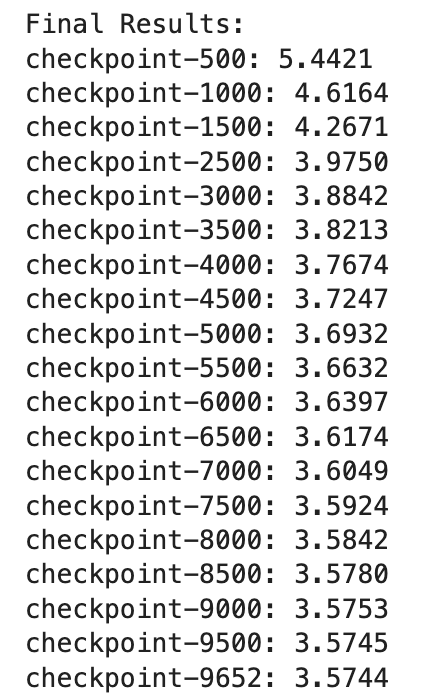
Luckily, the evaluation loss was decreasing, indicating no overfitting. I picked the last checkpoint due to the lowest evaluation loss.
4.2 Prepare the datasets
I selected the following instruction-following datasets and split them into 90%-10% for training and evaluation, respectively:
Here’s the code for configuring the tokenizer’s chat template and resizing the model’s token embeddings:
chat_template = """{% for message in messages -%}
{{ bos_token }}{{ message['role'] }}
{{ message['content'] }}{{ eos_token }}
{%- endfor -%}
{% if add_generation_prompt and messages[-1]['role'] != 'assistant' -%}
{{ bos_token }}assistant
{%- endif %}"""
tokenizer.chat_template = chat_template

model = AutoModelForCausalLM.from_pretrained(MODEL_PATH)
model.resize_token_embeddings(len(tokenizer))
model.config.bos_token_id = tokenizer.bos_token_id
model.config.eos_token_id = tokenizer.eos_token_id
model.config.pad_token_id = tokenizer.pad_token_id
Since the datasets were in different instruct formats, I wrote a method to transform them into a list of JSON:
# only showing the dolly method here, the alpaca is almost the same but with different column name (i.e, 'input' instead of 'context')
def format_dolly(ds_split):
    convos = []
    for ex in ds_split:
        instr = ex.get("instruction", "").strip()
        ctx = ex.get("context", "").strip()
        response = ex.get("response", "").strip()

        user_msg_parts = [instr]
        if ctx:
            user_msg_parts.append(ctx)
        user_msg = "\n\n".join(user_msg_parts)

        if user_msg and response:
            convos.append([
                {"role": "user", "content": user_msg},
                {"role": "assistant", "content": response},
            ])
    return convos
I also removed the examples that were longer than my context length:
def filter_and_prepare_conversations(convos, tokenizer_ref, max_len):
    filtered_convos = []
    for convo in tqdm(convos, desc="Filtering long conversations"):
        if not convo:
	        continue
        prompt_text = tokenizer_ref.apply_chat_template(
            convo,
            tokenize=False,
            add_generation_prompt=False
        )
        tokenized_len = len(tokenizer_ref.encode(prompt_text, truncation=False))

        if tokenized_len > 0 and tokenized_len <= max_len:
            filtered_convos.append({"conversations": convo})
        elif tokenized_len == 0:
            print(f"Zero length: {convo}")
    return filtered_convos
The last step for the dataset processing was to mask the non-assistant’s response so that they would not be used for calculating the loss value:
def formatting_func(example):
    # 'example' here is something like {"conversations": [{"role": ..., "content": ...}, ...]}
    conversation = example["conversations"]

    prompt_text = tokenizer.apply_chat_template(
        conversation,
        tokenize=False,
        add_generation_prompt=False
    )

    tokenized_inputs = tokenizer(
        prompt_text,
        truncation=True, # not really needed here bcs we already remove those that > max length
        max_length=MAX_LENGTH,
        return_attention_mask=True,
        padding="max_length",
    )
    input_ids = tokenized_inputs["input_ids"]

    labels = [-100] * len(input_ids)

    # find the last assistant response
    last_assistant_idx = max(
        idx for idx, turn in enumerate(conversation)
        if turn["role"] == ASSISTANT_ROLE_NAME
    )

    # iterate through the tokenized input_ids to unmask assistant content

    current_token_idx = 0
    for turn_idx, turn in enumerate(conversation):
        role = turn["role"]
        content = turn["content"]

        try:
            start_of_turn_bos_idx = input_ids.index(tokenizer.bos_token_id, current_token_idx)
        except ValueError:
            break

        search_for_eos_from = start_of_turn_bos_idx + 1 # search after the current BOS
        end_of_turn_eos_idx = -1

        for k_eos in range(search_for_eos_from, len(input_ids)):
            if input_ids[k_eos] == tokenizer.eos_token_id:
                end_of_turn_eos_idx = k_eos
                break
        if end_of_turn_eos_idx == -1:
            print(f"Warning: Could not find EOS token for turn: {turn}")
            return None

        role_and_newline_text = f"{role}\n"
        role_and_newline_tokens = tokenizer.encode(role_and_newline_text, add_special_tokens=False)

        # The actual start of content tokens
        start_of_content_idx = start_of_turn_bos_idx + 1 + len(role_and_newline_tokens) # +1 for BOS

        if role == ASSISTANT_ROLE_NAME and turn_idx == last_assistant_idx:
            # unmask tokens from start_of_content_idx up to (but not including) end_of_turn_eos_idx
                for k_label in range(start_of_content_idx, end_of_turn_eos_idx):
                    if k_label >= 0 and k_label < len(labels):
                        labels[k_label] = input_ids[k_label]

        current_token_idx = end_of_turn_eos_idx + 1

    return {
        "input_ids": input_ids,
        "attention_mask": tokenized_inputs["attention_mask"],
        "labels": labels,
    }
4.3 Training
Before starting the fine-tuning, I consulted my friend regarding some overfitting matters and he suggested me to have a look at NEFTune: Noisy Embeddings Improve Instruction Finetuning. Quoting the description of the paper below:
We show that language model finetuning can be improved, sometimes dramatically, with a simple augmentation. NEFTune adds noise to the embedding vectors during training. Standard finetuning of LLaMA-2-7B using Alpaca achieves 29.79% on AlpacaEval, which rises to 64.69% using noisy embeddings.
NEFTune was added into the SFTTrainer and could be enabled just using a line:
training_args = SFTConfig(
    neftune_noise_alpha=5,
)
However, my code ran into some issues when I was using SFTConfig and SFTTrainer, so I had no choice but to modify the input embeddings manually:
import torch
import types

def add_neftune(embedding_layer, noise_alpha):
    original_forward = embedding_layer.forward

    def new_forward(self, input_ids):
        if self.training:
            # Compute standard embeddings
            embed_init = original_forward(input_ids)
            L = input_ids.size(1) # sequence length
            d = embed_init.size(2) # embedding dimension

            mag_norm = noise_alpha / (L * d)**0.5
            # uniform noise
            noise = torch.zeros_like(embed_init).uniform_(-mag_norm, mag_norm)
            # add noise to embeddings
            return embed_init + noise
        else:
            # during inference, return standard embeddings without noise
            return original_forward(input_ids)

    # Bind the new forward method to the embedding layer
    embedding_layer.forward = types.MethodType(new_forward, embedding_layer)

NEFTUNE_NOISE_ALPHA = 5
embedding_layer = model.get_input_embeddings()
add_neftune(embedding_layer, noise_alpha=NEFTUNE_NOISE_ALPHA)
To prevent overfitting, I’ve also configured early stopping:
from transformers import EarlyStoppingCallback

early_stopping = EarlyStoppingCallback(
    early_stopping_patience=3
)

trainer = Trainer(
	...
    callbacks=[early_stopping],
)
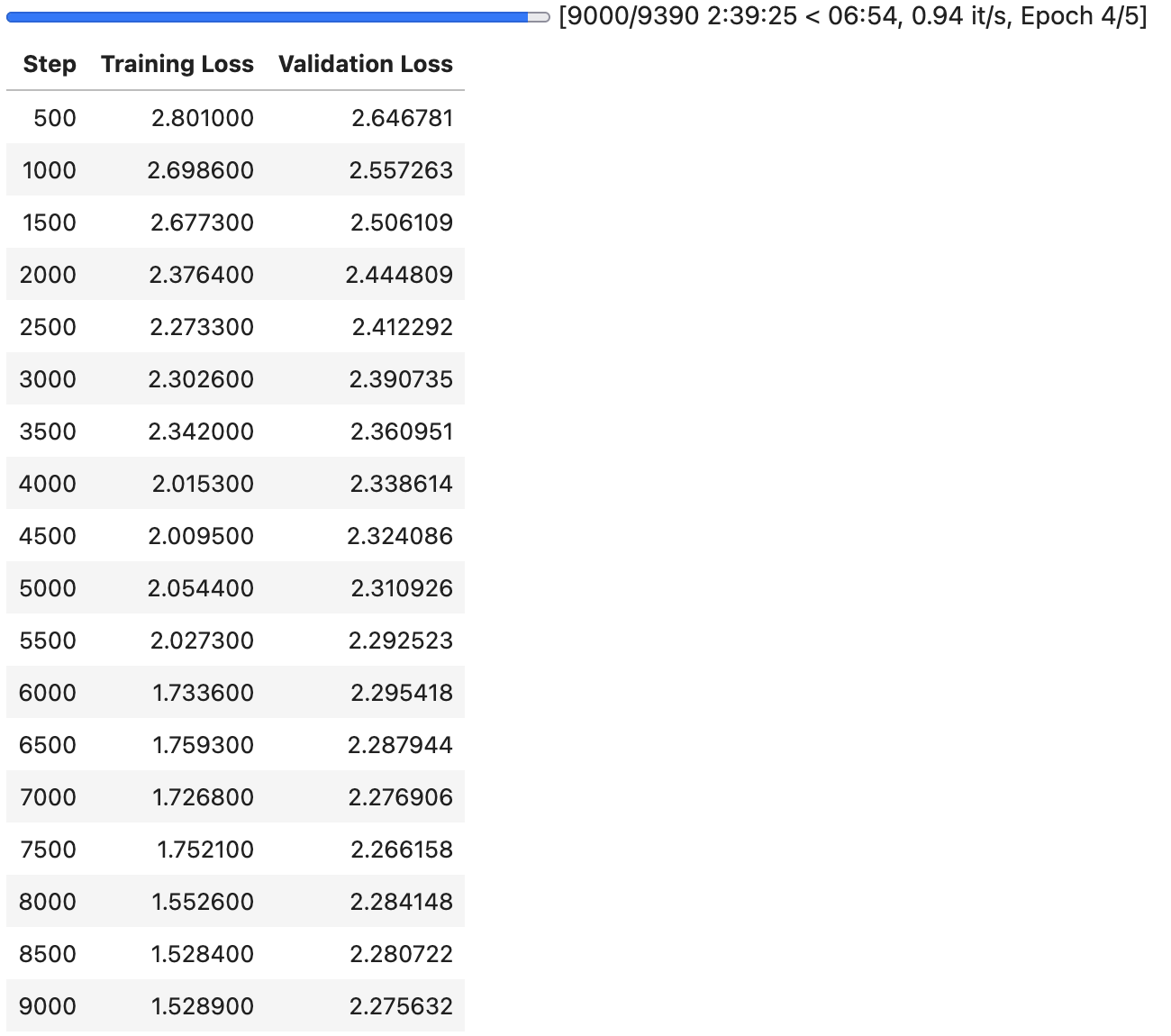
I then began training the model for five epochs, with an effective batch size of 32, using a single A100 40GB GPU. The training took about 2.5 hours and the best evaluation loss was 2.26.
4.4 Inference
Now, the moment of truth. I used the following code for inferencing:
from transformers import pipeline

pipe = pipeline("text-generation", model=FINAL_MODEL_PATH, tokenizer=FINAL_MODEL_PATH, device=0 if torch.cuda.is_available() else -1)

messages = [
   {"role": "user", "content": "Define the job accounting"},
]
# For generation, apply template with add_generation_prompt=True
prompt = tokenizer.apply_chat_template(messages, tokenize=False, add_generation_prompt=True)
outputs = pipe(prompt, max_new_tokens=100, num_return_sequences=1,eos_token_id=tokenizer.eos_token_id, pad_token_id=tokenizer.pad_token_id, repetition_penalty=1.1)
print(outputs[0]["generated_text"])
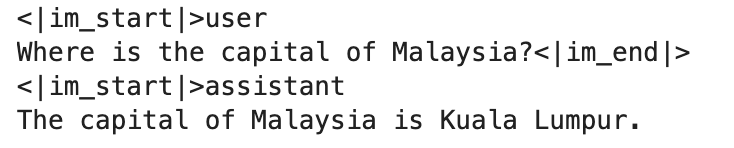
Here are some sample outputs:

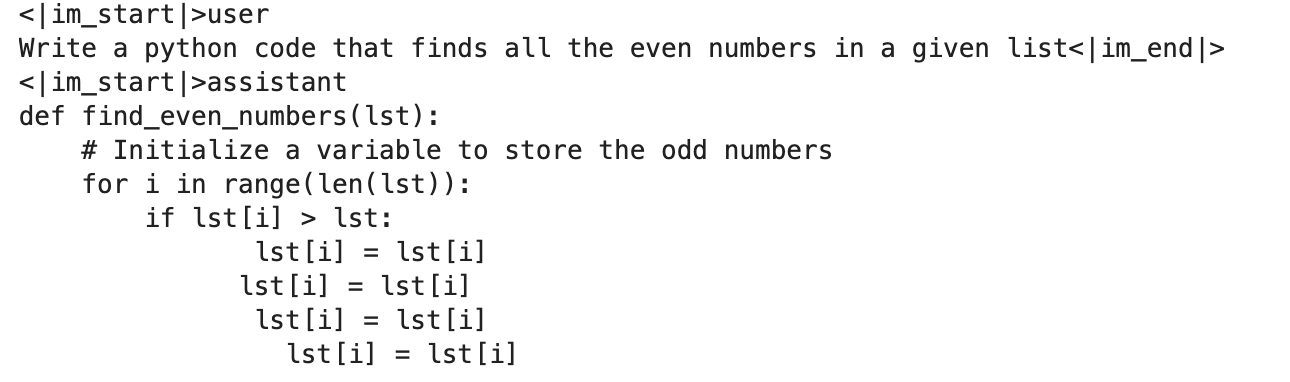
I also tried asking a coding question that failed miserably, which was expected because of the nature of my training dataset:
4.5 Benchmarks
I ran through some LLM benchmarks and here’s the result:
| Base Model | Instruct Model | |
|---|---|---|
| MMLU | 0.2292 | 0.2336 |
| MMLU - Humanities | 0.2414 | 0.2393 |
| MMLU - Other | 0.2401 | 0.2407 |
| MMLU - Social Sciences | 0.2164 | 0.2301 |
| MMLU - STEM | 0.2125 | 0.2214 |
| HellaSwag | 0.2742 | 0.2706 |
Conclusion
Thanks for reading until this far and I hope you learn something from this blog post like I did. I tried to keep the post shorter by omitting some experiments I conducted, but it looks like it’s still long. Anyway, have a nice day. :)
Appendix
This section documents some experiments that I conducted and some of the silly mistakes I made during the training.
A. Sampling Parameters
During the inference phase for the base model, I used the following code to generate the response:
txt = "Malaysia is a"
print(pipe(txt, max_length=150, num_return_sequences=1))
I noticed the model would repeat itself after a certain length, as shown in the image below:

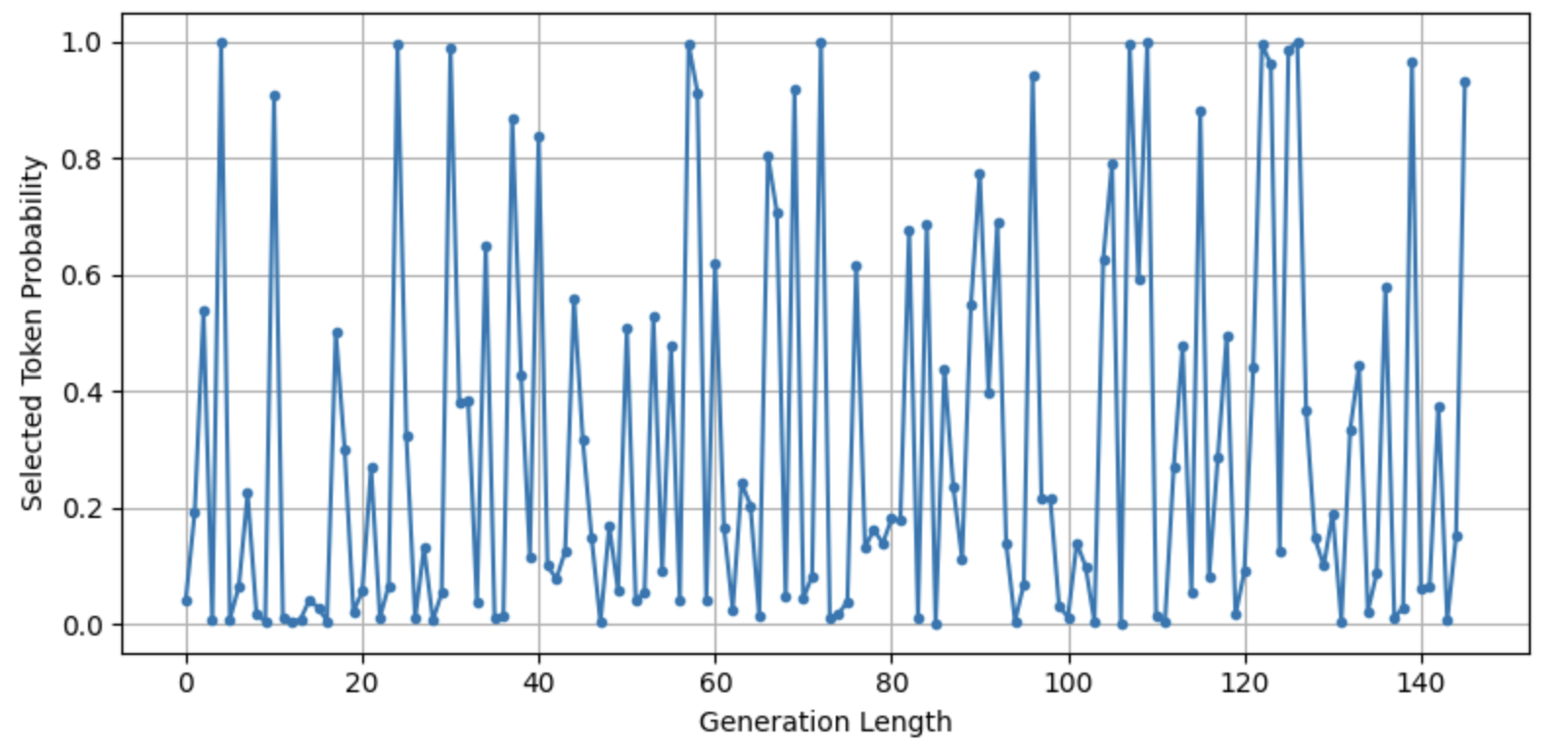
Since I didn’t set do_sample=True in the inference code, the model would output whatever token that had the highest probability at that position. I plotted an image showing the probability of the top-1 next token vs the generation length:
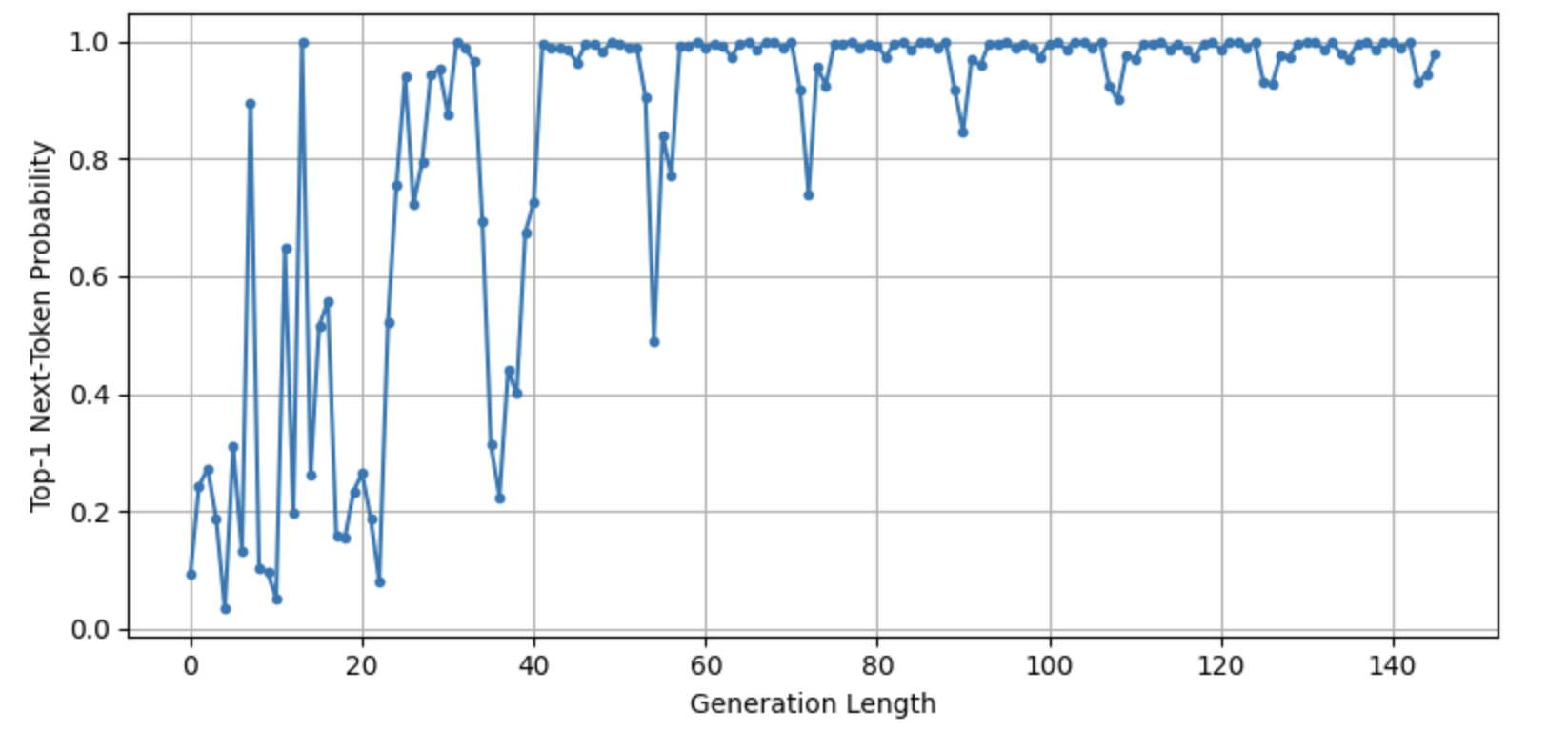 As we can see from the image above, the next token probability was increasing as the generation length increased; at some point, it even (almost) reached 1.0 probability. It also implied that the randomness was decreasing as the sentence became longer.
So, I added the do_sample=True so that the sampling parameters like temperature will be activated.
txt = "Malaysia is a"
print(pipe(txt, max_length=150, num_return_sequences=1, do_sample=True))
And now the output is much better:

I also tested setting repetition_penalty with a value of 1.1, which suppressed the repetition and gave me a more creative output.
I am still yet to figure out the exact reason of the repetition in my case, but there’s a good discussion over at Reddit if you’re interested.
B. Wrong dataset preparation method for model evaluation
In Section 4.1, I mentioned that I needed to select the best checkpoint to continue training. Initially, I used the following method to pre-process the evaluation dataset:
def collate_fn(batch):
    # batch is a list of dicts, each with key "text"
    texts = [ex["text"] for ex in batch]
    enc = tokenizer(
        texts,
        padding=True,
        truncation=True,
        max_length=1024,
        return_tensors="pt"
    )
    enc["labels"] = enc["input_ids"].clone()
    return enc

batch_size = 16
eval_dataloader = DataLoader(
    raw_dataset,
    batch_size=batch_size,
    collate_fn=collate_fn
)
Notice that instead of concatenating the datasets and chunking them as I did for the training dataset, I tokenized each example over here. When I ran the test, I noticed the evaluation loss was increasing:
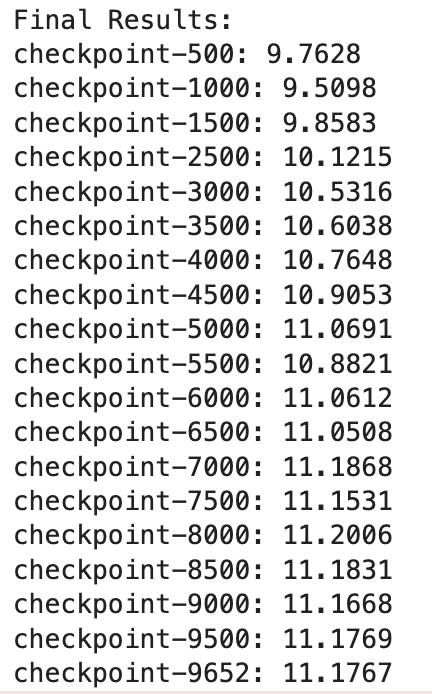
So, moral of the story: Always prepare the evaluation dataset using the same method you did for the training dataset.